An approach to handling Data Quality in ETL Pipelines: Practices and Strategies
An approach to handling Data Quality in ETL Pipelines: Practices and Strategies
In today’s data-driven world, the success of any initiative hinges on the quality of its data. Accurate, complete, and reliable data is paramount for effective analytics, informed decision-making, and seamless operational processes. This article presents a robust approach to proactively address and resolve common data quality issues, such as invalid city names, missing or incorrect postal codes, and inconsistent field values, directly within modern ETL pipelines. While third-party data quality utilities offer valuable solutions, this guide focuses on implementing an internal, customizable framework that aligns with your organization’s specific guidelines and best practices.
1. Utilize Data Profiling to Identify Issues
Before addressing data quality issues, it’s essential to understand your data. Data profiling helps uncover not only data type and volume, but also patterns, anomalies, and valid value ranges for each field.
The list of valid values can be later used in defining data quality rules.
Actions to take:
-
Identify valid values for fields such as city names or postal codes.
-
Detect missing, null, or out-of-range values.
-
Highlight inconsistencies like misspelled categories (e.g., “Mal” instead of “Male”).
2. Define a Data Quality Translation Rule Mapping Table
Standardizing corrections is crucial for repeatability and transparency. A data quality translation rule mapping table enables this by explicitly documenting transformations.
Key fields to include:
-
Column Name: The field to correct (e.g., “CITY”).
-
Source Name: Origin of the data. ( e.g. “Customer_Survey”)
-
Source Value: Invalid or inconsistent value (e.g., “toront”).
-
Target Value: Corrected value (e.g., “Toronto”).
-
Create Date: When the rule was defined. (e.g. today())
-
Enabled Flag: Indicates if the rule is active. (e.g. Lit(‘Y’))
This approach ensures consistent corrections across ETL processes. Deploy this table in your ETL schema or DQ(data quality) schema.
Example: Creating a Delta Table for Data Quality Rules in Databricks
To efficiently manage data quality rules, you can store them in a Delta table for versioning, scalability, and query performance. Here’s an example of how to set up a Delta table for this purpose:
Note that this should be stored in a table/csv/json, loaded to a dataframe and cashed for performance; but for examples sake, we will use a simple object.
Define the schema for the data quality rules
rules_schema = StructType([ StructField(“column_name”, StringType(), True), StructField(“source_name”, StringType(), True), StructField(“source_value”, StringType(), True), StructField(“target_value”, StringType(), True), StructField(“create_date”, DateType(), True), StructField(“enabled_flag”, BooleanType(), True) ])
Create a sample dataset of data quality rules
rules_data = [ (“CITY”, “external_source”, “toront”, “Toronto”, “2024-12-01”, True), (“CITY”, “external_source”, “toronto”, “Toronto”, “2024-12-01”, True), ]
Create a DataFrame with the sample data
df_dq_rules = spark.createDataFrame(rules_data, schema=rules_schema)
3. Integrate Data Quality Rules into ETL Processes
Incorporate the data quality translation rules as a step in your ETL pipeline. Load original data rows into a staging table and apply corrections in subsequent processing. Eg. An example to apply translation
def translate_DQ_rule(dfSrc:DataFrame, strSrcColumn:str, dfDQTranslation:DataFrame): “”” Arguments: dfSrc (DataFrame): Dataframe containing the data to be transformed. strSrcColumn (str): The name of the column in dfSrc to apply translations to. dfDQTranslation (DataFrame): Dataframe with translation rules (e.g., source_value to target_value). Result: DataFrame: A new DataFrame with data quality translations applied to the specified column. Sample: dfSrc = translate_DQ_rule(dfSrc, “CITY”, dfDQTranslation) “”” ## Apply translation return dfSrc
Recommended practice:
Apply corrections as Type 2 Slowly Changing Dimensions (SCD) to preserve the original row and track changes. This approach ensures a complete audit trail of both raw and corrected data.
Any data quality transformations should be placed in a separate library file with other user defined functions(UDFs) so that they can be shared with other notebook or projects.
Eg. you can import a library notebook via:
%run ../../libs/nt_library_DataQuality
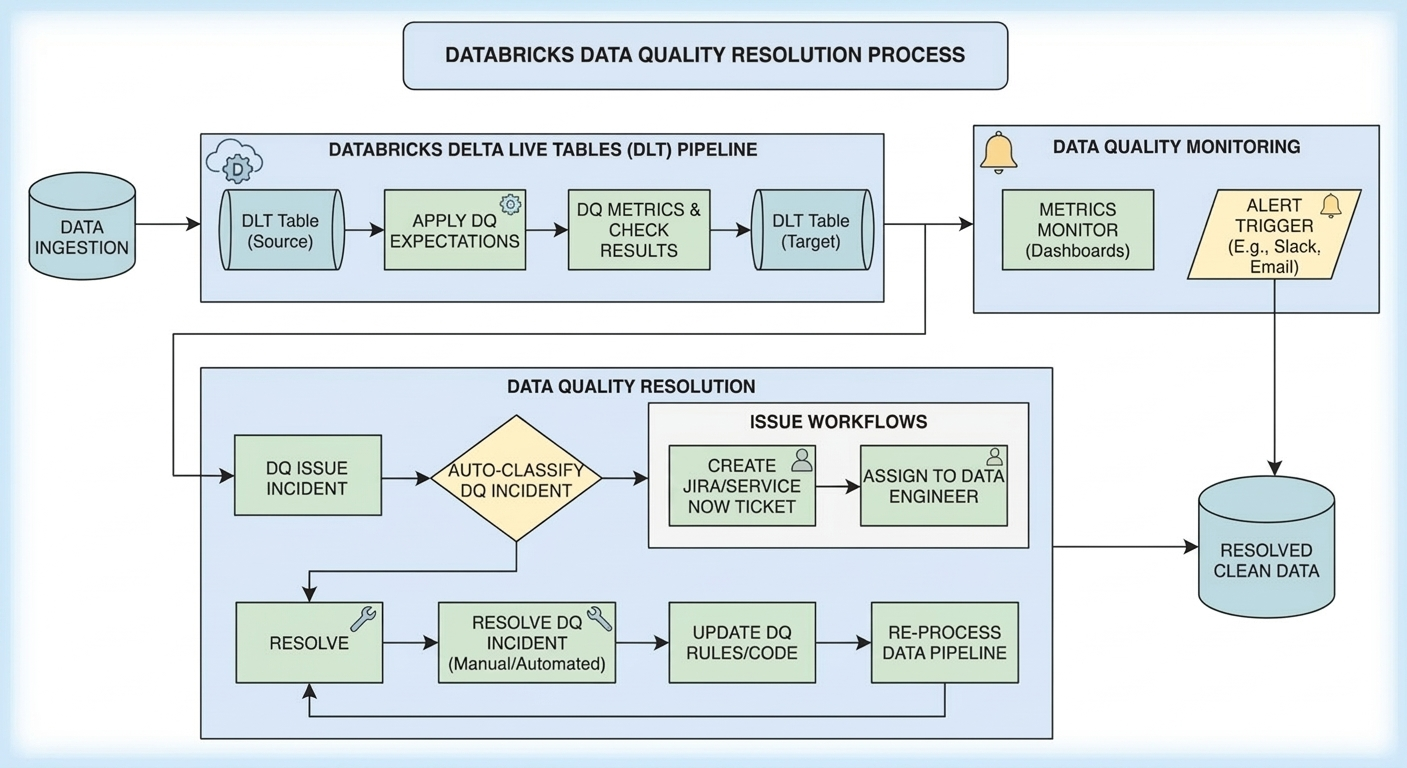
4. Track Data Quality Issues
Enhance the ETL process to log every data quality issue detected during loading. Maintain detailed records or generate summary reports showing the number of issues per field.
Benefits:
-
Provides transparency into the health of your dataset.
-
Identifies recurring issues that need systemic fixes (e.g., data entry errors).
5. Generate Data Quality Reports
Set up regular reporting on key data quality metrics, including:
-
The number of corrections applied by field.
-
Trends in data quality over time.
-
New or unexpected values in categorical columns.
These reports empower teams to monitor improvements and address emerging problems.
6. Leverage External APIs for Advanced Corrections
For fields like addresses, enrich your data with external APIs. For instance, a postal service API can validate and correct addresses based on authoritative databases.
Best practices:
-
Maintain a mapping of API corrections for review and approval to prevent overcorrection.
-
Use APIs selectively for high-value data fields to balance cost and quality.
Example Workflow for Address Validation
-
Original Data: Load raw records into a staging table.
-
Profile Data: Identify invalid or incomplete addresses.
-
Enrich Data: Query the API for potential corrections.
-
Review/Approve: Implement a mechanism for manual review of corrections, if needed.
-
Apply Corrections: Update data as a Type 2 change in the main table.
Conclusion
Handling data quality issues requires a structured, scalable approach. By leveraging data profiling, rule-based transformations, external APIs, and detailed reporting, organizations can improve the accuracy and reliability of their datasets.With these steps integrated into your ETL pipeline, you’ll be well-equipped to tackle even the most complex data quality challenges, driving better insights and business outcomes.What strategies have you implemented for managing data quality in your pipelines? Share your thoughts below!